Edward Boatman • Jul 30th
Brand guidelines are supposed to make your brand easier to use.
In reality, they often become one more thing people have to hunt for.
The brand guide lives in a PDF. The logos live in Google Drive. Product images are in Dropbox. Campaign assets are buried in Slack. The sales deck is saved on someone’s desktop. The agency has a draft version. Retail partners are asking for updated product photos. Someone on the team is still using the logo from two rebrands ago.
Technically, the brand guidelines exist. But they are not helping people do the work.
That is why more marketing and creative teams are moving from static brand guidelines to centralized digital brand guidelines. The goal is not just to document the brand. It is to create one living place where people can find approved assets, understand how to use them, and share the right materials with the right audience.
You centralize brand guidelines by moving your brand rules, approved creative assets, templates, product content, and usage instructions into one digital system that teams and partners can access when they need it.
Instead of keeping your guidelines in a static PDF and your assets in separate folders, centralized digital brand guidelines bring everything together in one place.
A centralized brand guidelines system should answer five simple questions:
The important shift is this:
Centralized brand guidelines are not just a prettier brand book. They are a working brand system.
Most brand guidelines are created with care. The problem is that the final guide often gets separated from the work.
A PDF can explain logo spacing, but it does not always include the actual logo files.
A shared folder can store campaign assets, but it does not always explain which files are approved.
A wiki can document messaging, but it may not match the sales deck, retailer sheet, product description, or eCommerce listing people are using.
That disconnect creates brand chaos in very normal ways. For example:
This is not usually a people problem. It is a system problem.
If the correct asset is hard to find, people will use whatever is closest. If the rule is buried in a PDF, people will skip it. If external partners have to email marketing every time they need something, marketing becomes the bottleneck.
Digital brand guidelines solve this by putting the rules, assets, and context together.
Centralized brand guidelines should include everything someone needs to understand and use the brand correctly.
That does not mean every working file, draft, or random screenshot belongs there. It means the approved, useful, current materials should be organized in a way people can actually navigate.
The usage guidance is the part many teams miss.
A logo file is helpful. A logo file with rules for where to use it, which format to download, and what not to do with it is much more helpful.
A product photo is helpful. A product photo with the right description, market notes, usage rules, and sales materials is much more useful for a retailer, distributor, or ecommerce team.
That is the heart of centralized brand guidelines: the asset and the explanation live together.
Centralizing your brand guidelines does not mean rebuilding your brand from scratch. It means taking the brand system you already have and making it easier to find, understand, update, and share.
Start by finding every place brand content currently lives.
Look for:
Then group everything into three buckets:
This step is not glamorous, but it matters. You do not want to centralize clutter. You want to centralize trust.
A static PDF can still be useful, but it should not be the only way people access the brand.
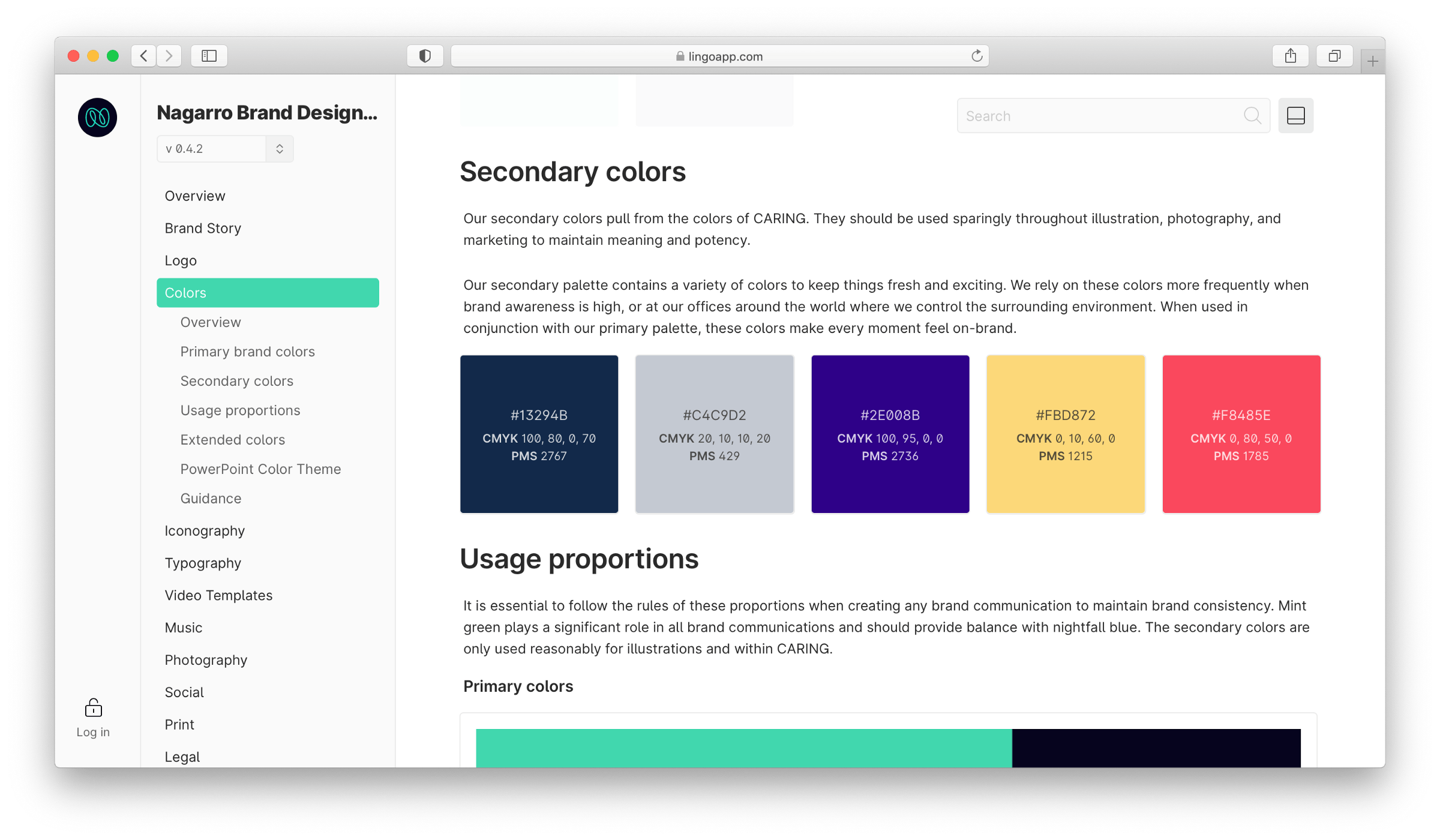
An interactive brand guideline system gives teams a more practical way to navigate the brand. Instead of scrolling through a PDF or digging through folders, people can move through organized sections like:
This is where Lingo’s Kit structure is especially helpful. A Kit can act like a flexible brand guidelines page where assets and instructions sit together. Instead of sending someone a PDF and a separate folder of downloads, teams can create a branded space that includes the guidance and the files in one view.
For example, a logo section can include the logo files, download formats, spacing rules, and usage notes all together. A product section can include product images, descriptions, sales sheets, and channel-specific guidance in the same place.
A traditional brand guide might be organized by design category:
That structure is still useful, but it is not always how people think when they are trying to get work done.
A sales rep may think, “I need the latest deck.”
An agency may think, “I need everything for this campaign.”
A retailer may think, “I need approved product photos and descriptions.”
A distributor may think, “I need the current sell sheet.”
The best digital brand guidelines platforms should support both brand categories and real workflows.
This is one of the biggest differences between static guidelines and digital brand guidelines. Digital guidelines can be shaped around the people using them.
This is the step that makes centralized brand guidelines actually work.
Every important asset should answer:
For example, a logo file might include:
A cannabis product image might include:
A beverage sell sheet might include:
It creates a digital brand hub and it’s where brand consistency becomes much easier. People are not guessing. The guidance lives right next to the thing they are using.
Not everyone needs access to the full brand system.
Your internal creative team may need the entire asset library. Your sales team may need decks, product sheets, and approved visuals. Your agency may need brand rules and campaign materials. Your retailers may need product photos, descriptions, and sell sheets. Your distributors may need product catalogs and seasonal resources.
Audience-specific spaces keep things clean.
In Lingo, this is where Kits and Portals are useful.
A Kit can organize a specific set of assets and guidelines. A Portal can bring multiple Kits together into one branded hub.
That means a team could create:
This matters because external sharing is where many brand systems break.
If every retailer, agency, vendor, or partner has to email marketing for the latest asset, the system is still too manual. A centralized brand guidelines system should give approved audiences a self-serve way to find the right materials without giving them access to everything.
Centralized brand guidelines only work if people trust that they are current.
That means someone needs to own the system.
At minimum, define:
The goal is not to add red tape. The goal is to prevent old assets from hanging around forever.
When the logo changes, update it once. When product packaging changes, update the product assets once. When campaign materials expire, archive them once. When retailer content changes, update the source instead of emailing new attachments to every partner.
That is what makes digital brand guidelines more scalable than static files.
Centralized brand guidelines look different depending on the team and industry.
Here are a few practical examples.
The common thread is simple: fewer repeat requests, fewer outdated files, and fewer brand mistakes.
Digital asset management still matters. It is just not the whole story.
A DAM gives your brand guidelines the structure behind the scenes. It helps teams store, organize, search, manage, and share approved assets.
But the brand guidelines layer is what gives those assets meaning.
Without digital brand guidelines, a DAM can become another organized file cabinet. Helpful, but still missing context.
With digital brand guidelines, the asset library becomes easier to understand. People can see the rule, find the file, read the usage note, and download the right version from the same place.
For marketing and creative teams, that connection is the real value.
You are not just saying:
“Here are our files.”
You are saying:
“Here are the approved materials, here is how to use them and their description, and here is who they are for, and by the way, you can download that here, too.”
Lingo is a right-sized digital asset management solution built for teams that need digital brand guidelines, approved asset libraries, flexible Kits, branded Portals, and external sharing in one place.
This makes Lingo a Google Drive alternative for creative asset management. It’s especially useful for marketing and creative teams that have outgrown Google Drive, Dropbox, SharePoint, or scattered folder systems, but do not need a heavy enterprise DAM rollout.
Lingo helps teams centralize brand guidelines by giving them a way to connect assets with the context people need to use them correctly.
Teams can use Lingo to:
For example, a cannabis brand of cannabis MSO setup could use Lingo to create a retailer Portal with product photos, menu-ready descriptions, market-specific assets, sales sheets, and usage notes.
A food and beverage brand could create a distributor Kit with product photography, flavor descriptions, sell sheets, campaign materials, and approved brand copy.
A wholesale brand could give eCommerce partners a branded space with product images, descriptions, seasonal assets, and usage guidance.
A marketing team could create one central brand Portal that includes brand guidelines, campaign Kits, press materials, sales enablement resources, and partner content.
That is where Lingo is different from a basic folder system. It does not just help teams store brand assets. It helps teams turn those assets into usable brand guidelines and shareable brand experiences.
Use this checklist before moving your brand guidelines into a digital system.
If you can answer these questions, you are ready to move from static guidelines to a more useful digital brand system.
Centralized brand guidelines are a digital home for your brand rules, approved assets, templates, usage instructions, and sharing resources. They help teams and partners find the right materials and understand how to use them correctly.
You centralize brand guidelines by moving your brand rules, approved assets, product content, templates, and usage notes into one searchable digital system. The goal is to make the brand easy to find, easy to understand, and easy to share safely.
Digital brand guidelines are easier to update, search, organize, and share than a static PDF. They can also connect directly to approved assets, so people do not have to read the rules in one place and hunt for files somewhere else.
Digital brand guidelines should include logos, colors, typography, voice and tone, imagery rules, templates, product assets, campaign materials, sales resources, usage instructions, and external sharing guidance.
Digital asset management supports brand guidelines by organizing the approved files behind the brand system. It helps teams store, search, manage, and share assets, while digital brand guidelines explain how those assets should be used.
A team should move to digital brand guidelines when people regularly ask for the latest files, use outdated assets, struggle to find approved materials, share files manually with partners, or need different brand resources for sales, agencies, retailers, distributors, or eCommerce teams.
Google Drive, Dropbox, and SharePoint can work for basic file storage, but they often break down when teams need better visual organization, usage guidance, external sharing, permissions, and version clarity.
Centralized brand guidelines help external partners by giving them a self-serve place to find approved assets, product content, templates, and usage instructions. This reduces one-off requests and helps partners use the brand correctly.
Product-led brands can use digital brand guidelines to connect brand rules with product photos, descriptions, sell sheets, menu content, ecommerce assets, distributor materials, and retailer resources. This is especially useful for cannabis, CPG, food and beverage, wholesale, retail, and eCommerce-adjacent teams.
Lingo helps teams centralize brand guidelines by combining a broader brand asset management process to digital brand guidelines, flexible Kits, branded Portals, and external sharing. Teams can organize brand rules, assets, product information workflows, and partner resources in one place.
Brand guidelines should not be something people only open during onboarding or a rebrand.
They should be part of daily work.
The sales rep should know where to find the latest deck. The agency should know which logo to use. The retailer should know where to grab product photos. The distributor should have the current sell sheet. The ecommerce team should be able to pull approved descriptions. The designer should not have to answer the same file request over and over.
That is the real reason to centralize brand guidelines.
Not to make a prettier rulebook. Not to organize folders for the sake of organizing folders.
The goal is to create a living brand system where the right assets, rules, and context are easy to find and easy to use.
When brand guidelines are centralized, teams move faster. Partners make fewer mistakes. Creative teams get fewer repeat requests. And the brand becomes easier to protect because it is easier for everyone to follow.
To see how other brands are doing digital brand guidelines, take a look at the Curaleaf case study and the Lime case study.