Edward Boatman • Oct 27th
If you manage marketing or brand operations for a cannabis company, you already know the routine. A dispensary asks for updated product photos. A wholesale partner needs descriptions for a new SKU. Someone on the sales team copies a product image from a months-old email thread, and now a dispensary in Illinois is running California-approved packaging on its menu.
The real problem is not that your dispensary partners are careless. It is that they have no reliable place to find your approved product content. Emails get buried. Shared links expire. Spreadsheets fall out of date the moment someone adds a new strain. A dispensary product portal built for cannabis brands gives your partners a single, branded destination where the right photos, descriptions, and assets are always current and always approved.
This guide walks through exactly how cannabis brands organize, control, and share product content with dispensaries through branded portals. You will learn how product catalogs, Kits, and Portals connect, how to segment content for different states and partners, and how Lingo Channels makes catalog changes visible so dispensaries know what needs updating.
Here is the honest version of where most cannabis brands are right now: product photos live in a shared drive, descriptions sit in a spreadsheet, and dispensaries get a ZIP file or a long email chain whenever something changes. That approach usually holds up through the first handful of SKUs.
Once a brand crosses into multiple product lines or a second state, the system breaks. Photos get attached to the wrong descriptions. Dispensaries run outdated images on their menus because nobody told them a new version existed. And when a customer searches for your product on Dutchie or Jane and the listing does not match what is on the shelf, you lose trust before the purchase even happens.
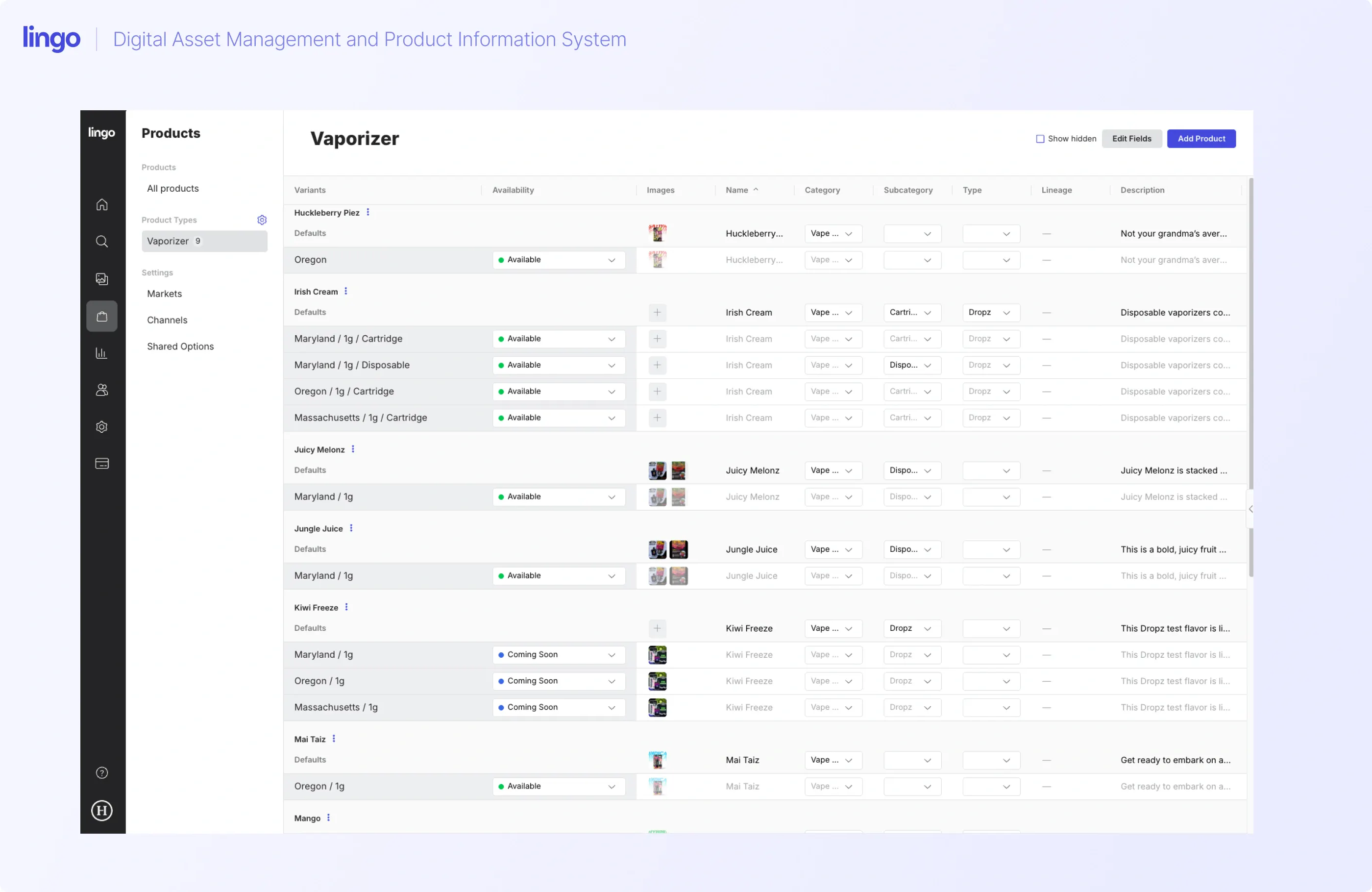
A product information management approach solves this by tethering each product's structured data (names, descriptions, strain info, cannabinoid details, warnings) directly to its approved imagery and packaging files. Instead of sending assets piecemeal, you build a product catalog once, keep it current in one place, and share it through a branded portal that dispensaries can access whenever they need it.
A dispensary product portal is a branded, web-based destination where your retail partners go to find approved product content. It is not a consumer shopping page. It is the place where dispensary teams, budtenders, and wholesale partners pull the photos, descriptions, and supporting materials they need to accurately represent your products on their POS systems and menus.
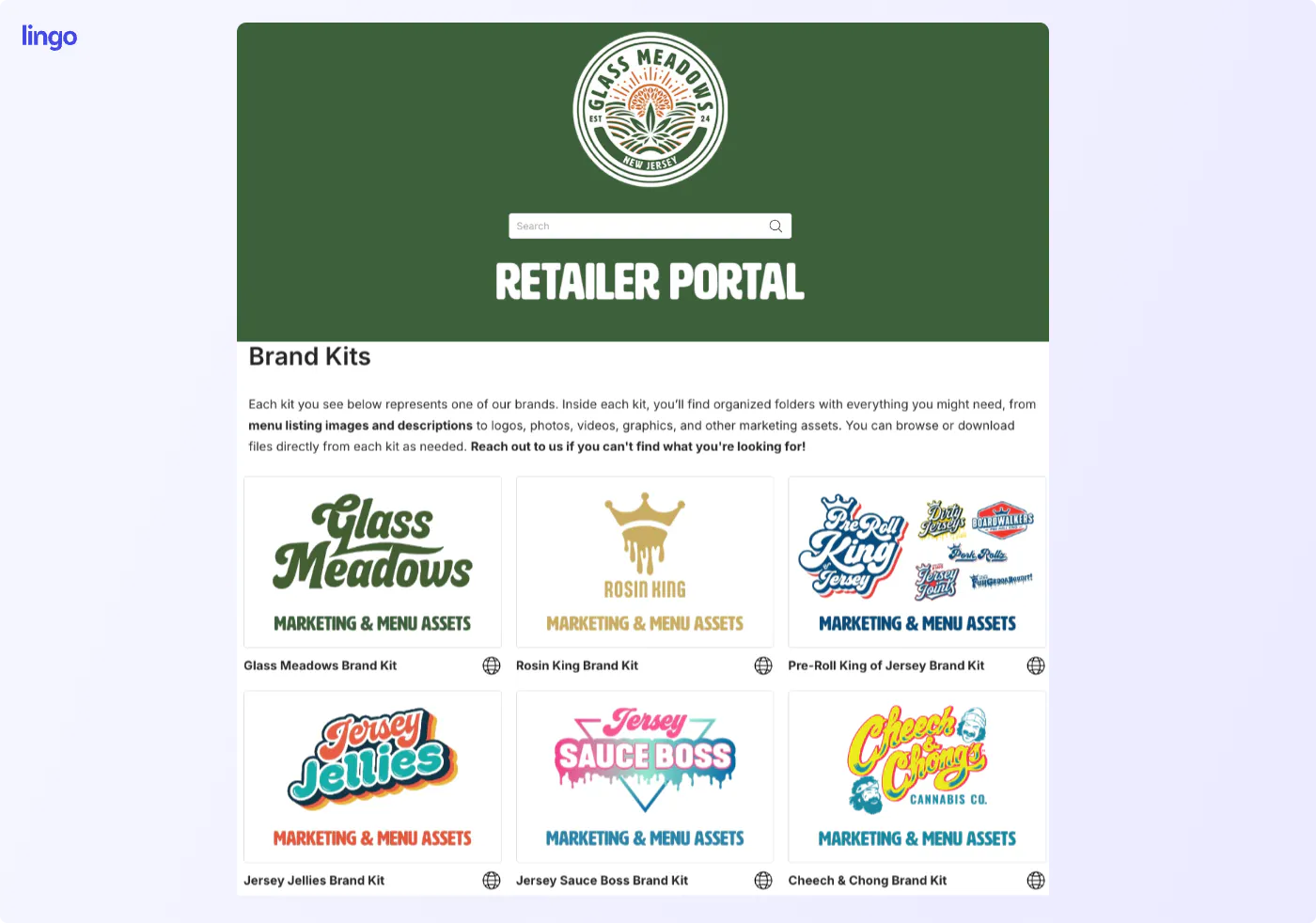
In Lingo, a Portal acts as a branded front door. You customize the look, add your logo and colors, and populate it with curated Kits. Each Kit contains specific product assets and contextual information organized for a particular audience or purpose. The dispensary partner opens their Portal link and sees only the content relevant to them, laid out with the context they need to use it correctly.
This matters because dispensaries do not just need files. They need files with context: which state is this packaging approved for, what are the current product descriptions, which photo is the hero shot versus the detail shot. A Portal delivers that context alongside the assets in a way that a shared link to a drive full of numbered image files never can.
Below are a few examples of public portals our brands have set up for their dispensary and distribution partners:
Understanding the relationship between these three layers is key to building a portal that actually works for your dispensary partners. Each layer serves a distinct purpose, and together they create a connected system.
Lingo's Products feature connects structured product information (descriptions, SKU details, sizes, strain data, warnings) with the visual assets that go with each product: photos, packaging files, marketing graphics. This is your product catalog, the single source of truth for everything a dispensary needs to represent a given product.
Product catalog functionality is available with all Lingo plans. When you update a description or swap in new photography, the change lives in one place and flows through to any Kit or Portal where that product appears.
A Kit is a curated collection of assets and context built for a specific audience or purpose. You can think of a Kit as a focused container. It packages exactly what someone needs, nothing more and nothing less.
For a cannabis brand, a Kit might contain all the product catalog entries for a specific brand or product line, complete with hero photos, descriptions, effects, and terpene profiles. You could build one Kit per brand, one per product category, or one per state, depending on how your partners need to consume the content. Kits also support contextual information like usage guidelines, notes, and headings that help dispensary teams understand how to use each asset.
Portals group your Kits together and present them in a branded, navigable experience. A dispensary partner opens the Portal link and lands on a page that looks and feels like your brand, with the relevant Kits organized and accessible.
You can create as many Portals as you need. An MSO operating in six states might create one Portal per state, each containing Kits for the brands active in that market. A single-brand operator might build one Portal for all dispensary partners with Kits organized by product line. The structure adapts to how your business and your partners actually work.
Here is a practical setup workflow you can follow to get your first dispensary product portal live. This applies whether you are an MSO with dozens of brands or a single-state operator with one product line.
Lingo Products are very flexible so as a first step, it’s important to consider the structure that’s important to you. We recommend starting with setting up these three elements:
As you set these up, anything in Lingo can be overridden to make specific adjustments along the way.
For each product, add the structured information dispensaries need: product name, description, strain type, cannabinoid and terpene details, size or weight, and any required warnings. Then attach the approved visual assets: hero photography, detail shots, packaging files, and any supporting materials like sell sheets or COAs.
This is the foundation. Once your catalog is built, every Kit and Portal you create draws from this central source. Update a product description once, and the change appears everywhere that product is referenced.
Decide how your dispensary partners need to access your content. Common Kit structures for cannabis brands include:
Add the relevant product catalog entries to each Kit. Use headings and contextual notes to give dispensary teams the usage guidelines they need. A Kit dedicated to the actual brand (logos, colors, voice, and tone) may have headings and notes about approved use of the logo, or when to use specific colors.
Create a Portal for each audience segment. Add the relevant Kits to each Portal and arrange them in the order that makes sense for your partners. Customize the Portal's branding: logo, banner, colors, and fonts so it looks and feels like your brand when a dispensary team member opens it.
Choose the right access level for each Portal:
Individual Kits inside a Portal can also have their own privacy settings, so a public Portal can still contain private Kits visible only to specific users. This layered access model lets you control exactly who sees what.
Send the Portal link to your dispensary partners. From here, maintenance is about keeping your product catalog current. When you add a new SKU, the product entry flows into the relevant Kit and appears in the Portal automatically. When you update photography or descriptions, the change reaches everyone with access.
Segmentation is where the real operational power of Portals comes through, especially for cannabis brands distributing across multiple states, brands, or partner types.
Cannabis packaging and descriptions often differ by state because compliance requirements differ by state. A one-gram live resin cart sold in Missouri, California, and Massachusetts might carry the same brand, but the label, required warnings, and even approved descriptions change based on where it is sold.
Building one Portal per state solves this cleanly. The Illinois Portal contains only Kits with Illinois-approved content. The California Portal contains only California-approved assets.
Dispensary partners in each state see only what applies to their market, which eliminates the risk of someone pulling a Missouri-approved image for an Illinois listing. Bloom and Curaleaf, each being one of the largest multi-state cannabis operators, uses this exact approach in Lingo. Each state has its own Portal acting as a hub for every brand operating in that region.
Cannabis brands in a single market with multiple brands have some options. Some choose to use the Portal for the brand and the Kits to separate elements of the brand. Others might use the portal as a retailer repository and the Kits in it for each brand as a resource Kit.
Sometimes, our wholesale partners use Lingo to build a one-off communication Portal. For example, if a dispensary partner carries three of your five brands, you can build a Portal containing only those three brand Kits specifically for your retailer.
Distributors are in charge of distribution for several brands so the Portal contains all brands they represent, and the Kits are the individual brands. Each Kit contains everything a retailer needs for that specific brand. The point is that each Portal serves a specific audience with exactly the content they need.
Keeping product content current is one thing. Making sure your dispensary partners know something changed is another problem entirely.
This is where Lingo Channels comes in. Channels show changes across your product catalog so dispensaries can identify which product entries have been updated. If you swap in new photography for a strain, update a product description, or add a new SKU, Channels surfaces that change.
Here is what Channels does not do, and this distinction matters: Channels does not automatically update your dispensaries' POS systems or menu platforms. It does not push data into Dutchie, Jane, or any other third-party system at this time. What it does is give your dispensary partners visibility into what changed, so they know exactly which entries need attention on their end.
In practice, this means a dispensary team can check Channels, see that three product descriptions were updated and two new SKUs were added, and then make those updates in their POS or menu platform. The manual step still exists, but the guesswork is gone. Instead of waiting for an email from your brand team or wondering whether the photo they downloaded last month is still current, dispensaries have a clear view of what needs their attention.
Most digital asset management platforms are built for general-purpose file organization. They handle storage and basic sharing well enough, but they were not built for the specific operational demands of cannabis.
Cannabis brands need to be able to make regional adjustments to their products while still retaining a core record. Plus, product information and visual assets must travel together.
A dispensary does not just need a JPEG of your product. They need the JPEG alongside the approved description, the strain type, the cannabinoid profile, and the state-specific compliance details. General-purpose DAM tools store files, but they do not connect structured product data to those files in a way that dispensary partners can actually consume.
Cannabis brands also need state-level segmentation, curated sharing with external partners, and the ability to control exactly who accesses what content. Lingo connects the product catalog directly to Kits and Portals, creating a system where product information and assets are managed together, curated for specific audiences, and shared through a branded experience dispensaries can access on their own.
A product portal is only as useful as the content inside it. Here are practical steps to keep your portal current as your catalog evolves.
When a new product launches, add it to your product catalog in Lingo first. Build the product entry with all structured data and approved imagery. Then add it to the relevant Kit. Because that Kit already lives in the appropriate Portal, the new product becomes available to your dispensary partners as soon as you add it.
Update the product entry directly in your catalog. The change flows through to every Kit and Portal referencing that product. Use Kit versioning to stage updates before releasing them, especially during a brand refresh or packaging overhaul. You can work in the shared draft, prepare all your changes, and release a new version when everything is finalized.
For seasonal or limited-edition products, you have two options:
This keeps the Portal clean and ensures dispensary partners only see products they can actually order.
The dispensary teams representing your products on their menus and shelves are working with whatever content they can find. If that content is scattered across emails, old spreadsheets, and expired shared links, your brand shows up inconsistently. Wrong photos, outdated descriptions, and mismatched product information are not just inconvenient. They cost you search visibility on platforms like Dutchie and Jane, erode consumer trust, and create compliance exposure.
A dispensary product portal built in Lingo gives your partners a single, branded source of truth for every product photo, description, and asset they need. Product catalogs connect structured data to imagery. Kits curate that content for specific audiences. Portals deliver it through a professional, on-brand experience. And Channels keeps your partners informed when something changes so they can update their POS and menus accordingly.
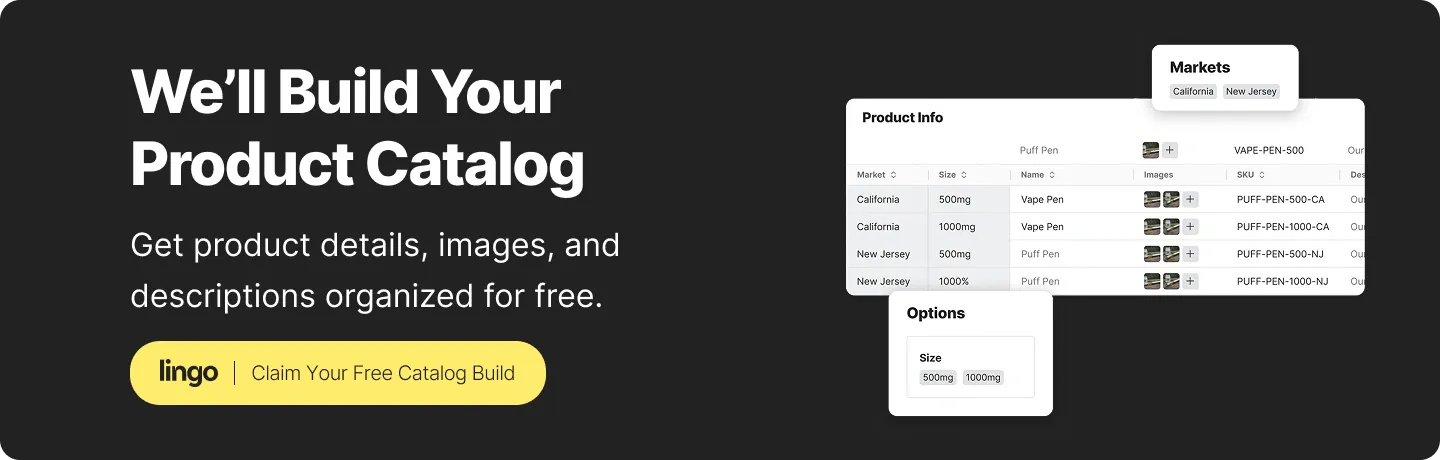
Cannabis brands can request a free product catalog build during their Lingo trial. Start your free trial and request your catalog build directly inside Lingo.
Cannabis brands send product photos and descriptions to dispensaries through a branded product portal. Lingo connects structured product data (descriptions, strain info, warnings) directly to approved imagery in a product catalog. That catalog lives inside curated Kits, which are shared through a Portal that dispensary partners can access at any time.
A Kit is a curated collection of assets and context built for a specific purpose or audience. A Portal groups multiple Kits together into a branded, navigable destination. You build your product content into Kits, then deliver those Kits to dispensary partners through a Portal that carries your branding and access controls.
No, not yet. Lingo Channels shows dispensaries which product catalog entries have changed so they can identify what needs a manual update in their POS or menu platform. Channels make changes visible, but downstream updates to platforms like Dutchie or Jane still require manual steps by the dispensary team.
Multi-state operators build one Portal per state in Lingo, each containing Kits for the brands and products approved in that market. This ensures dispensary partners in each state see only state-specific content, reducing the risk of running assets from the wrong jurisdiction on a live menu.
Yes. Lingo Portals offer three access levels:
Individual Kits inside a Portal can also have their own privacy settings, so you can build layered access controls that match your distribution needs.
Product catalog functionality is available to all Lingo customers, but Channels and Markets are available on Lingo Business plans and above. These features let you connect structured product information with imagery and surface catalog changes to your dispensary partners.