Edward Boatman • Aug 4th
Your agency needs the latest campaign images. Sales asks for the current deck. A retail partner needs a product photo, and someone on your team is trying to confirm which logo is approved for a dark background.
Everything technically exists in Google Drive. The problem is that finding and sharing it has become a marketing job of its own.
That is usually when teams start looking for a Google Drive alternative. They do not necessarily need to replace every Google Doc or spreadsheet. They need a better system for the approved content people repeatedly search for, download, and share.
For marketing teams managing a growing library of approved brand and campaign content, a digital asset management platform is usually a better alternative than another cloud storage tool. A DAM makes visual assets easier to find, adds context about how they should be used, and gives internal teams and external partners a more controlled way to access them.
Lingo is the best overall fit for growing marketing teams that have outgrown shared folders but do not need a heavy enterprise DAM system. It brings approved assets and digital brand guidelines together, then helps teams distribute that content through flexible Kits, branded Portals, and direct links.
Google Drive can still handle working documents and everyday collaboration. The DAM becomes the trusted home for approved marketing content.
Google Drive is not a bad product. It is familiar, works well with Docs, Sheets, and Slides, and makes real-time collaboration easy. Shared drives also let organizations retain files when employees leave, while search filters and labels provide more structure than basic folders alone. Google documents these capabilities in its guides to shared drives, search and labels, and external file access.
For working files, meeting notes, budgets, and collaborative documents, that may be exactly what a team needs.
The trouble starts when marketing tries to use the same structure as a complete brand and content distribution system. A person may find the logo file but not know whether it is approved, where it should be used, or whether a newer version lives elsewhere. An agency may have access to one campaign folder but still needs to email marketing for the brand guidance that explains the assets inside it.
Storage answers, “Where did we put the file?” Marketing asset management has to answer several more questions:
This is when your brand marketing system breaks. When those answers depend on one person’s memory, the folder structure is no longer doing enough.
A digital asset management system, or DAM, is software used to organize, manage, and distribute digital content. Unlike general cloud storage, a DAM is built around how teams find, understand, and reuse visual assets.
Google Drive is the stronger choice for creating documents, collecting feedback, and collaborating in real time. A DAM may support some collaborative workflows, but document creation is usually not its main purpose.
Both systems can store files. Google Drive organizes them primarily through shared folders, while a DAM provides additional ways to structure content using metadata, tags, collections, and other organizational tools. A DAM allows for content and context to be on one canvas whereas in Google Drive, the context might exist in a Google Doc while the content lives elsewhere in Google Drive.
Google Drive can display visual previews, but finding content is still largely dependent on navigating folders. A DAM is designed for visual discovery, making it easier to browse and compare assets across a large library.
Google Drive provides search and some labeling options. A DAM allows teams to search using details such as campaign, audience, usage rights, approval status, or other custom metadata tied to the asset.
In Google Drive, brand guidance is often stored in a separate document that people must remember to open. A DAM can present instructions alongside the approved assets, helping people understand which file to use and how to use it correctly.
Google Drive allows teams to share folders and access links. A DAM can provide curated collections or brand portals created for specific audiences, such as agencies, sales teams, distributors, or other external partners.
With Google Drive, teams usually need to manage the shared source carefully or send a new link when the file changes. Some DAMs support persistent asset links, allowing an updated file to remain available through the same link.
The important distinction is not that one system stores files and the other does not. Both do. The difference is how much context and control the system provides after a file is uploaded.
The number of files in your Drive is not the best way to judge whether you need an alternative. A small library can still be difficult to manage if many people need to use it. A much larger library may remain workable when one close-knit team understands its structure.
Look at the behavior around the system instead.
Repeated requests for logos, campaign images, templates, or the newest sales deck are a sign that people do not trust themselves to find the right content. The assets may be available, but they are not truly self-service.
When the official folder is difficult to navigate, employees and partners save local copies or build smaller folders they understand. Those workarounds feel efficient until the source asset changes and older copies remain in circulation.
A brand guideline PDF in one folder cannot provide much help when someone downloads a logo from another. If people have to search for instructions after finding the file, many will make their best guess instead.
A Drive link is easy to send. The harder part is making sure an agency, distributor, freelancer, or sales partner sees only the relevant content and understands what to do with it. If every share requires a follow-up email or walkthrough, the process is not scaling.
Deleting an outdated file does not remove the copies already downloaded or duplicated elsewhere. When the team cannot tell which version partners are using, even a simple update turns into a chase.
The right system should solve the problems your team actually has. Buying the longest feature list can leave you with an expensive platform that no one wants to use.
People rarely remember an exact filename. They remember that an image came from the spring campaign, showed a particular product, was approved for social, or belonged to a specific client. Your alternative should make those details searchable without requiring everyone to understand an elaborate folder structure.
The system should make the current, usable asset easier to find than old drafts. This may involve metadata, status fields, permissions, or a separate presentation layer that only exposes approved content.
A correct file can still be used incorrectly. Look for a way to place practical guidance near the asset, such as logo spacing rules, campaign notes, download instructions, or approved messaging.
Your internal team, sales organization, agency, and wholesale partners do not all need the same view of the library. A useful alternative should let marketing curate content by audience without copying the same files into several disconnected folders.
The platform has to make sense to the people downloading content, not only the administrators who selected it. During a trial, ask someone outside marketing to locate an approved asset without coaching. That test will tell you more than a polished product demo.
A “Google Drive alternative” can describe two very different purchases. One replaces your cloud storage and document-collaboration system. The other gives marketing a purpose-built home for approved content while Drive remains available for working documents.
OneDrive makes the most sense for teams already working inside Microsoft 365 that need to store files and co-edit Office documents. However, it is still a general cloud storage and collaboration system rather than a platform built specifically for managing approved marketing assets.
Dropbox is a practical choice for syncing, transferring, and sharing large files through a familiar folder structure. The limitation is that moving from one folder-led system to another may not solve problems related to asset context, brand guidance, or content governance.
Air is designed for visual creative work, including asset discovery, feedback, and approvals. Its primary focus is the creative workflow, so marketing teams should consider whether they also need a system for presenting digital brand guidelines and distributing approved content to broader audiences.
Stockpress offers straightforward digital asset organization, search, and sharing for marketing and creative teams. Teams evaluating it should confirm whether its approach to presenting assets and managing brand governance fits the way their organization works.
Brandfolder is built for enterprise asset governance and content distribution across large organizations. Its broader capabilities and rollout requirements may be more than a small or mid-market marketing team needs.
Lingo is designed for marketing teams that need to manage approved assets, keep digital brand guidance close to the content, and create curated destinations for different audiences.
Google Drive can continue handling Docs, Sheets, and everyday collaboration, while Lingo becomes the visual, controlled home for approved marketing content. It is not intended to replace Google’s document-creation tools.
The names matter less than the category decision. If your primary problem is co-editing documents or managing general file storage, consider platforms such as OneDrive or Dropbox. If the real problem is controlling, organizing, and distributing approved marketing content, compare purpose-built DAM systems such as Air, Stockpress, Brandfolder, and Lingo.
Lingo is designed for teams that have outgrown Google Drive, Dropbox, SharePoint, or a scattered folder system but do not want DAM implementation to become a major enterprise project.
The Asset Library gives marketing a central source for approved assets. Instead of relying only on filenames and nested folders, the team can add metadata and organize content in a more visual workspace. That makes it easier to find the right campaign image or client asset without opening files one by one. It also allows you to share a single file into multiple work spaces without duplicating assets across multiple locations.
Lingo Kits provide the presentation and context that cloud storage often lacks. A Kit can combine approved assets with practical instructions, so a person sees both what to use and how to use it. Marketing can build a campaign Kit for an agency, a sales enablement Kit for the revenue team, or a brand-guideline Kit that keeps rules beside the assets they govern.
Branded Portals create a cleaner entry point for different audiences. Rather than exposing an entire backend library or maintaining duplicated partner folders, marketing can group relevant Kits into a self-service destination. Public, private, and password-protected sharing options help the team match access to the audience.
Direct links can also keep an asset connected to its source. When the file behind a Lingo direct link is updated, the link continues to work and serves the new version. That is useful when an approved image appears in a website, email, or another repeatable workflow because marketing does not have to replace every instance manually. Lingo’s direct-link documentation explains how those updates work.
Lingo has a Google Drive integration that lets users import selected files into a Lingo Asset Library or Kit. It is a one-way import, not an ongoing sync. Later changes in Drive do not automatically update Lingo, and changes in Lingo are not pushed back to Drive.
That separation supports a practical division of labor:
Teams that want to move approved assets out of Drive can import them without downloading and re-uploading each file manually. Lingo documents the process in its Google Drive integration guide.
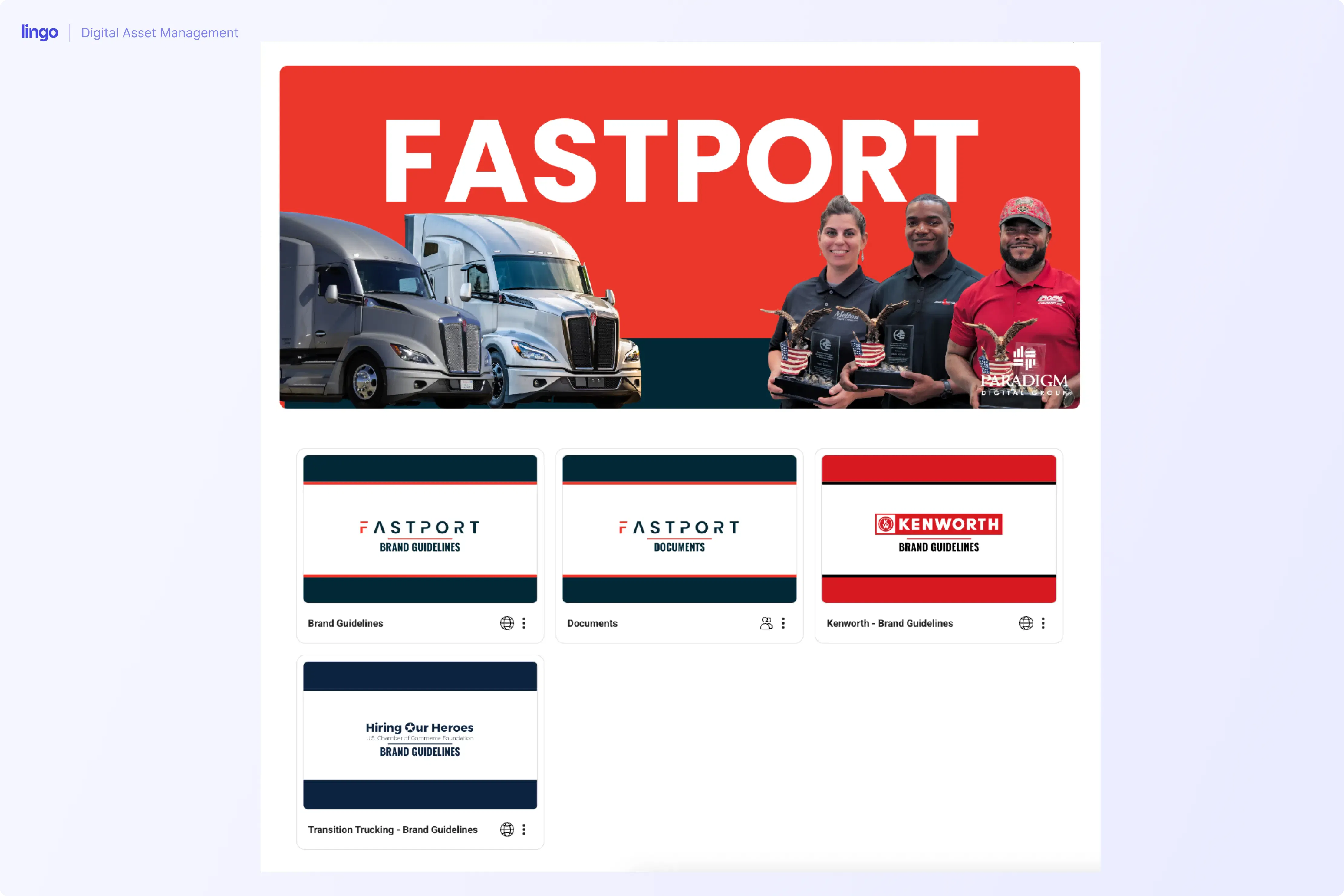
Paradigm Digital Group did not move from Google Drive. Its team had accumulated more than 57,000 files in Dropbox while managing assets for over 25 client brands. The storage platform was different, but the marketing problem was the same one many Drive users recognize.
Files were difficult to browse visually, duplicates had accumulated, and outdated images or incorrect brand colors could slip into new work. Rachel Sabotta, the agency’s Digital Brand & Design Specialist, was also fielding recurring requests for logos, color values, resized images, and other client assets.
Paradigm began building separate visual brand systems in Lingo for its clients. Team members could copy a logo, grab an approved color value, or download the correct file without interrupting Rachel. Even during the early rollout, the agency reported that internal confusion and asset requests had fallen by at least 50 percent.
The lesson is not simply that one storage provider is better than another. Folder-based storage becomes harder to trust when an agency or marketing team manages many brands, audiences, and versions. Paradigm needed a system built around how people identify and use assets, not only where files were stored. Read the full Paradigm Digital Group customer story.
A migration does not need to begin with every file your company has ever created. In fact, moving the entire mess into a new platform often recreates the same problem.
Start with the content that generates the most questions. That might be your core brand assets, the materials sales uses every week, or the campaign files shared with an outside agency.
Decide which drafts should remain in collaborative tools and which finished assets belong in the trusted marketing library. This creates a clear purpose for each system and reduces duplicate management.
Build the search structure around questions people actually ask. Campaign, audience, approval status, market, and content type may be useful, but your team probably does not need dozens of fields on day one.
Do not organize everything solely around how marketing created it. A salesperson may think in terms of customer segment, while an agency may think in terms of campaign. Curated Kits or Portals can give each audience a logical path without duplicating the underlying assets.
Give a few real users a task: find the approved logo, download the current campaign image, or confirm how an asset may be used. Watch where they hesitate, adjust the structure, and then bring over the next content group.
For teams that need to organize and distribute approved brand and campaign content, a digital asset management system is usually the best alternative. Lingo is a strong overall choice for growing marketing teams because it combines a visual asset library, digital brand guidelines, a product management system, and flexible external sharing without requiring a heavy enterprise rollout.
A DAM is better for managing a large, active library of visual marketing content. Google Drive remains better suited to general file storage and live collaboration in documents, spreadsheets, and presentations. Many teams use both, assigning each system a different job.
Yes. Google Drive can hold drafts and collaborative documents while a DAM holds approved assets that need stronger organization, usage context, and controlled distribution. Some DAM platforms also provide an import integration to simplify the move from Drive.
Consider a DAM when people regularly ask marketing to locate assets, use outdated files, create duplicate folders, or need help understanding which content they can share. These behaviors are stronger warning signs than file count alone.
Dropbox or OneDrive may be a better fit when the primary need is cloud storage, file syncing, or collaboration within a different software ecosystem. If the problem involves asset approval, brand guidance, visual discovery, or partner distribution, moving to another general storage platform may not go far enough.
No. Start with approved, frequently requested marketing assets. Keeping drafts and working documents in Drive can make the transition smaller and give each platform a clear purpose.
You do not have to overhaul your entire company file system to make marketing content easier to use. Begin with the assets that create the most interruptions and give them a clear, trusted home.
Lingo helps marketing teams turn approved content into a visual, self-service system for employees, agencies, sales teams, and external partners. You can import selected files from Google Drive, organize them with the context people need, and share them without handing over your entire working library.
Start a free Lingo trial and build your first approved marketing Kit.