Edward Boatman • Oct 29th
Imagine your team is launching a puffer jacket. Marketing has approved new photography. The operations team has corrected the case dimensions when case packs updated. But, your retail contact is building the listing from a spreadsheet downloaded before either change was available.
Everyone has part of the right information, but rarely are they all in sync.
For a growing brand, product content syndication starts with a practical job: connect approved product facts to the right assets, prepare what each recipient needs, and make someone responsible for carrying changes through to the listing. That process matters whether your destination is a Shopify storefront, an Amazon listing, a retailer's new item setup sheet, or even a dispensary menu.
Start by fixing the handoff. Then choose the tools that support it.
A spreadsheet gives your team a place to organize product information. An asset library gives them a place to manage photography, packaging files, and other creative content. The problem is that these two resources are inherently out of sync—spreadsheets and digital assets are stored separately.
Return to the jacket example. Its description might be current, but the linked image could show last season's color. The case quantity might be correct now, but retailers have a prior spreadsheet with incorrect dimensions. A row marked ‘complete’ tells you little unless your team agrees on what ‘complete’ means.
Give each part of the record an owner. Marketing can maintain approved descriptions and photography. Operations can verify packaging and shipping information. A catalog owner can coordinate review and distribution. The recipient needs an owner, too: the person responsible for applying the update in the retailer's system.
Those responsibilities can belong to different people or to the same person at a small brand. What matters is that someone is accountable for the whole handoff, including corrections after launch.
Product content syndication is the distribution of product information and assets to selling destinations in the formats those destinations require. The delivery can involve manual work or automation. Acquia's overview includes both approaches in its definition.
There are three jobs to consider:
These jobs can live within the same platform. Sharing a catalog gives a recipient access to product content. Publishing a listing puts that content into the destination's system. Your distribution process needs to account for both actions. Your process should account for how each destination actually receives content, including who handles any manual steps.
Start with one product family and collect the information any third-party resource might need on hand. Identify it, list it, and order it.
For our hypothetical puffer jacket, that record could include elements like:
Keep shopper-facing content distinct from trade information. A product description and a shipping specification serve different purposes, even when both belong to the same jacket. They can appear in the same spreadsheet, but visible to different audiences.
Record units alongside measurements, and identify which fields each recipient needs. Use the retailer's actual requirements to decide when the record is ready. A filled-in spreadsheet is only useful if it contains the right information.
Document who maintains each field and who approves the record for sharing. Give the catalog owner a clear way to resolve conflicting versions before distribution.
For example, marketing should not have to guess whether a new case dimension is final. Operations should not have to choose between two similar product photos. Each contributor should know which information they are responsible for approving and ensuring accuracy.
Record the review date and the intended recipient or market. When something changes, return it to the relevant owner for review. This is a process your team establishes; buying a catalog tool does not decide those responsibilities for you.
Structure the record so shared facts and specific differences are easy to distinguish. Our jacket might share a description across sizes but need different photography for each color.
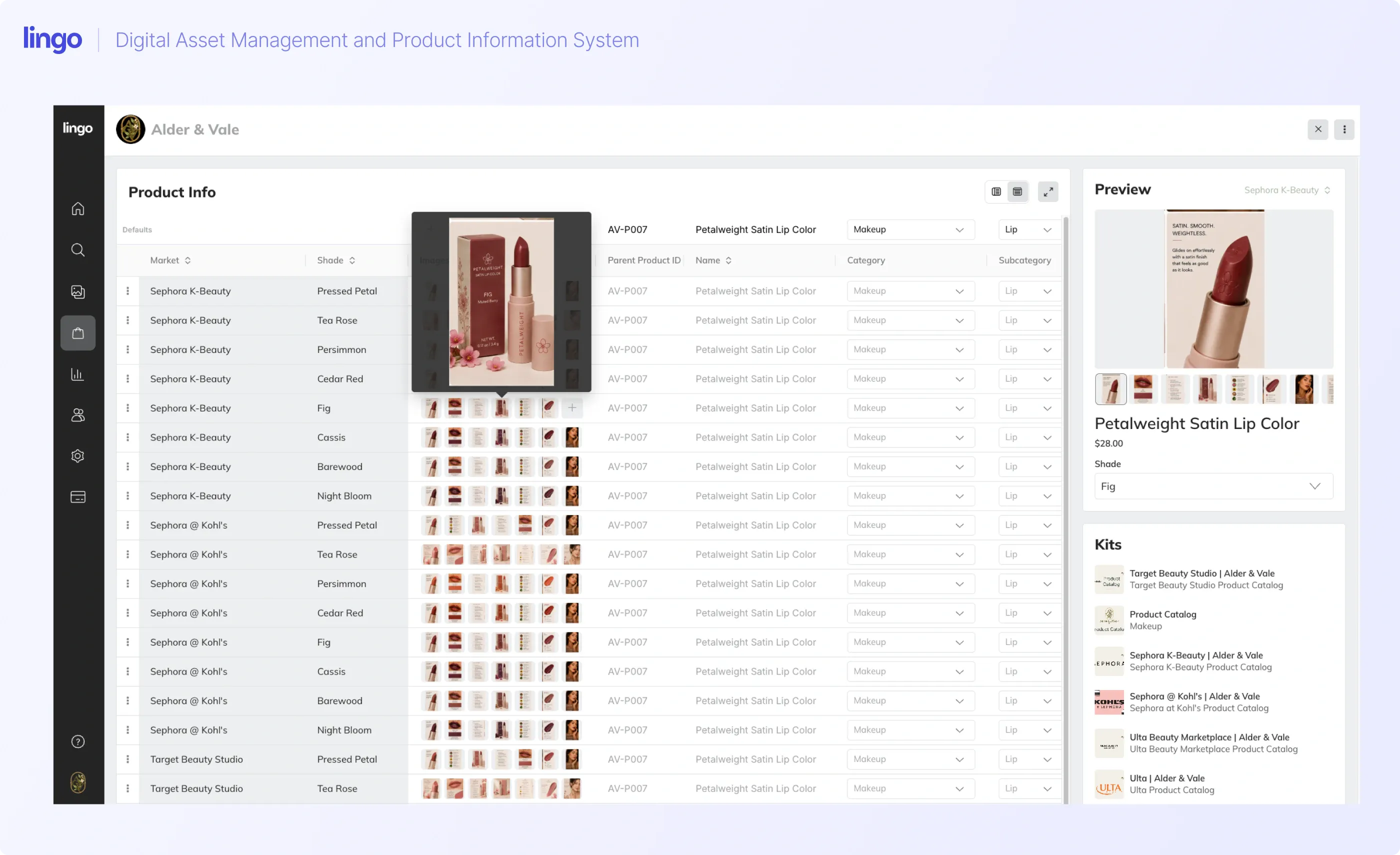
Consider another hypothetical example: a lipstick available in 20 shades, with full-size and travel-size options. Organize the product family together, then associate each option with its own identifiers, details, and imagery. A retailer should be able to select the exact item without guessing which image belongs to it.
Market-specific content adds another layer. A cannabis brand may need to distribute different approved packaging images or descriptions for different markets. Keep those versions clearly identified and have the appropriate internal reviewer approve them before sharing.
In Lingo's interview with Dabstract, Brand Manager Kellie Gaustad describes organizing Kits and Portals around specific markets. That is a useful operational example: give the recipient a clear route to the content intended for their territory.
Ask for the recipient's requirements before assembling the handoff. Confirm required fields, image specifications, naming conventions, accepted file formats, and the submission method.
Also ask who will maintain the listing after the initial setup. The person who requests launch assets may not be the person responsible for future corrections.
Use those requirements to prepare the appropriate content from your approved, single-source record. If a retailer supplies a new item spreadsheet, map your information to that template. If the recipient works from a shared catalog, make the relevant assortment easy to locate.
Keep the underlying product facts consistent while adapting the presentation. A shorter description should still accurately describe the same jacket.
Give recipients a dependable place to find approved product information and associated images. Where a recipient requires a file submission, keep that export connected to an identifiable version of your source record.
When you make a change, communicate the action required. For the jacket, a useful update would identify the SKU, affected color or size, revised information, and whether an image needs replacing.
Use a simple change checklist:
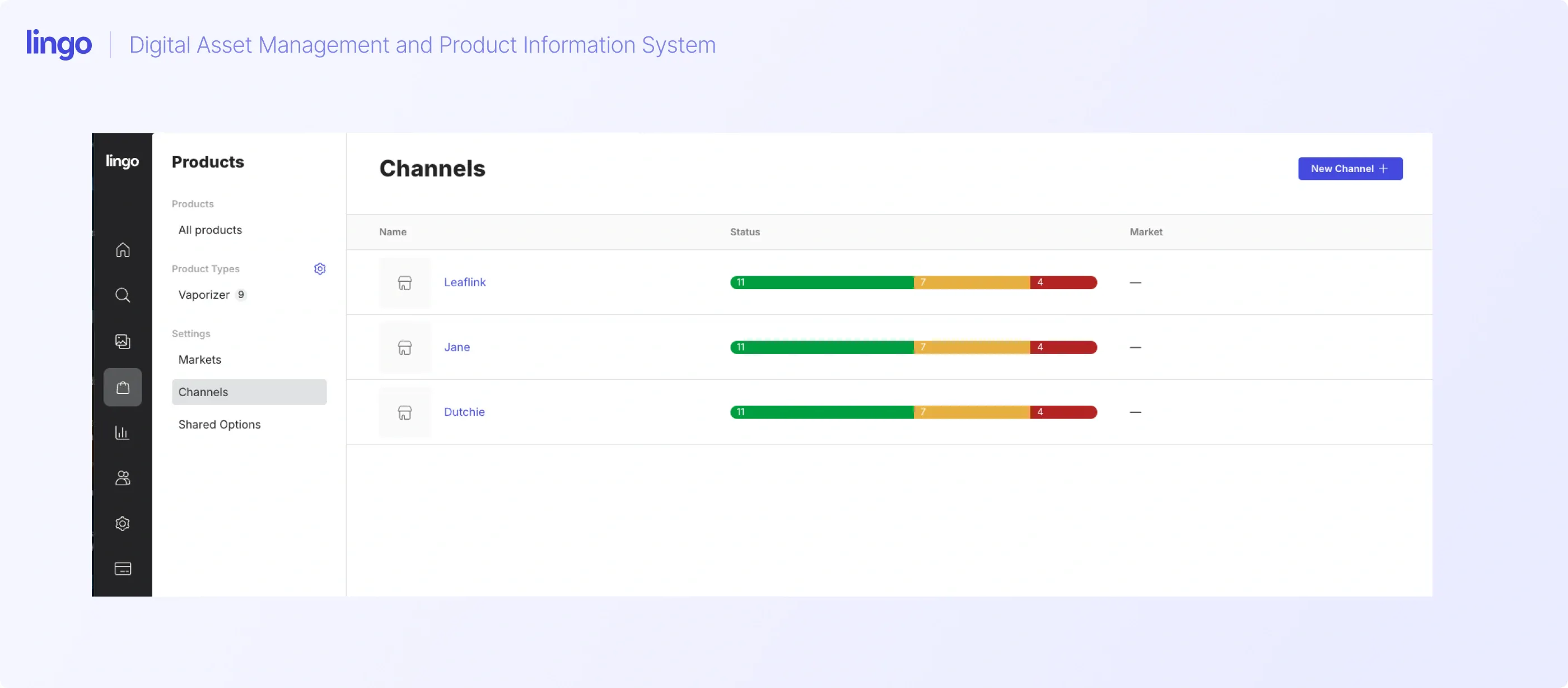
Tools like Lingo communicate these changes in real-time through their Channels feature. When you have a single product sold in several retail channels, you can track exactly what needs to be updated, by Channel, at any time. This gives you confidence that your Channels are in full synchronization with your spreadsheet.
Make the handoff specific enough that the retailer can act without reconstructing the history of your catalog. Lingo does that, above, with cannabis retailers by creating Channels of point-of-sale systems where brands appear.
After an update, compare the destination with the approved source. Check the product name, description, variant, and imagery. Confirm any trade information separately with the recipient when it is not publicly visible.
Keep track of corrections that still need action. A changed source record, a recipient opening a link, and an updated retail listing are different events.
Dabstract's interview describes a human process for menu remediation: identify inaccurate imagery, have the relevant sales representative contact the store, and provide the correct assets. The retailer handoff still needs follow-through until the confidence is achieved that changes are occurring as expected.
Agree on how your team will confirm completion. That might be a live-page check or a reply from the person who maintains the listing. Choose a method you can repeat when the next update arrives.
Lingo is a digital brand hub that brings product information and digital assets together. The Products functionality gives that connection a place within your brand's content workflow.
For the jacket example, the goal is a product record that keeps descriptions and relevant imagery together, so the person preparing the retail listing can work from a shared source. Product catalogs can be added to Kits, and Kits can be added to Portals, giving you a way to organize product content alongside the other materials a retailer needs.
Think about the handoff from the recipient's side. They need to identify the correct item, read its information, and access the associated assets. Organize the shared content around that task, with downloads available according to the access you provide.
The Glass Meadows Brand Tenders interview illustrates this approach. The team uses Lingo to present product information alongside downloadable assets and training materials. The Glass Meadows team provides product details for retailers to copy into their menus.
Lingo also describes market variants and overrides for managing product differences. When planning your catalog, identify which information belongs to the core product and which content needs a market-specific version. Test that structure with your actual product records before extending it across the catalog.
Channels help recipients see changes to your product catalog. Build that visibility into your update process, with an agreed owner responsible for reviewing the changes and acting on them.
In this workflow, the recipient reviews the updated information, downloads the relevant imagery or copies the required text, and applies the changes in their external tool. That could be a person maintaining a Shopify storefront, an Amazon listing, or a dispensary's product catalog.
You do not necessarily need an enterprise PIM to improve product content distribution. Start with the work your team and recipients need to complete, then evaluate the capabilities required to support it.
A maintained spreadsheet and asset library may be a workable starting point when your team can reliably manage the relationships, review changes, and keep recipients informed. Test that process with real updates. If nobody can tell which version a retailer is using, address that gap.
A digital brand hub with a product catalog is worth considering when your immediate need is to bring product facts and imagery together and give recipients access to usable content. Lingo fits this part of the workflow, including sharing through Kits and Portals and making catalog changes visible through Channels.
Specialist PIM and syndication capabilities deserve closer evaluation when you need more complex data modeling, retailer-specific transformations, validation, or supported direct connections. For example, Akeneo Activation describes native commerce integrations and retailer syndication. Check the exact destinations and workflows supported by any platform you evaluate.
Company size alone does not settle the decision. A small brand can have demanding retailer requirements. Ask which fields and assets you must maintain, how many variants and market versions you need, and whether recipients expect self-service access, templates, or direct delivery. Then identify who will own the work that remains manual.
Use one product family to test the full process. Complete the record, attach the right images, assign owners, prepare the retailer's requirements, and follow an update through to the listing.
That gives your team a concrete way to evaluate product content syndication: can the right person find the right content and apply the change correctly?
Start a free trial and we'll help you create your product catalog.